This small RISC-V homeserver can host almost anything 🚀

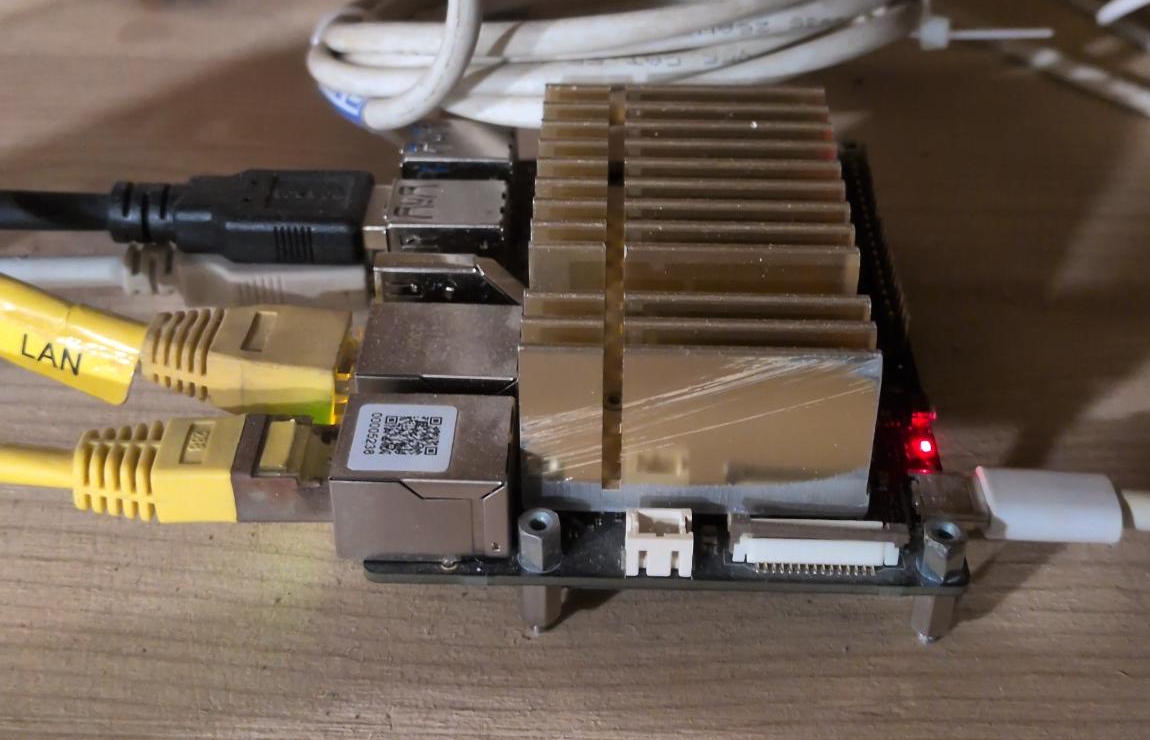
Getting NixOS running with various web services and features on this StarFive VisionFive 2 SBC took some years but finally it’s taking shape.
If you’re reading this blog post, you reached our new tiny homeserver in the basement of our living community in Karlsruhe, Germany. It’s running behind a standard cable internet NAT and a 5V USB power supply. Attached is a 20TB external HDD, Bcachefs encrypted, storing backups, music and movies.
Linux mainline
First of all, this RISC-V SBC has great Linux mainline support. So the first thing to do was to test and boot the mainline kernel and further package it for NixOS. By flashing an up-to-date U-Boot bootloader, the SBC could also run NixOS from NVME SSD.
Using some patches by @magicquark, I was able to switch to Btrfs as a root filesystem, which will get useful for our backup approach explained later in the post. See here how you can generate a Btrfs-enabled rootfs image.
Small hardware, many features
Lets come to the interesting part, because this small board is able to host a lot of websites, web services and scripts. I’m using the NixOS config as a guidance to walk you through.
AirPrint server
Attached is an older but good working laser printer via USB. Using this snippet, it’s shared in the local network so you can print directly from any PC or smartphone using AirPrint.
hardware.printers = {
  ensurePrinters = [
    {
      name = "Brother_HL-2150N";
      location = "Home";
      deviceUri = "usb://Brother/HL-2150N%20series?serial=L8J996110";
      model = "drv:///brlaser.drv/br2150.ppd";
      ppdOptions.PageSize = "A4";
    }
  ];
  ensureDefaultPrinter = "Brother_HL-2150N";
};

services = {
  printing = {
    enable = true;
    openFirewall = true;
    drivers = [ pkgs.brlaser ];
    browsing = true;
    defaultShared = true;
    listenAddresses = [ "*:631" ];
    allowFrom = [ "all" ];
    extraConf = ''
      DefaultPaperSize A4
      ReadyPaperSizes A4
      DefaultLanguage de
    '';
  };

  avahi = {
    enable = true;
    nssmdns4 = true;
    openFirewall = true;
    publish = {
      enable = true;
      userServices = true;
    };
  };
};
Pixiecore PXE netboot server
This is a neat little service which will enable other devices in your network to boot Linux systems via PXE. It will serve the netboot.xyz multiboot image.
pixiecore = {
  enable = true;
  openFirewall = true;
  dhcpNoBind = true;
  kernel = "https://boot.netboot.xyz";
  port = 8081;
  ##};
Navidrome music streaming
I switched from Jellyfin to Navidrome music streaming service. It runs fine on RISC-V, is less memory intensive and super fast.
navidrome = {
  enable = true;
  settings = {
    EnableSharing = true;
    PlaylistsPath = "/mnt/audio/playlists";
    MusicFolder = "/mnt/audio/music";
  };
};
Prometheus and Grafana
Using these two services, we are going to gather some power consumption and solar power statistics soon. Well, new projects incoming …
grafana = {
  enable = true;
  settings = {
    server = {
      http_addr = "127.0.0.1";
      http_port = 8083;
      enforce_domain = true;
      enable_gzip = true;
      domain = "grafana.project-insanity.org";
    };
    analytics.reporting_enabled = false;
  };
};

prometheus = {
  enable = true;
  port = 9006;
  extraFlags = [
    "--storage.tsdb.retention.time=5y"
    "--storage.tsdb.retention.size=99GB"
  ];
};
Incremental full disk remote backups
Using Btrbk we snapshot the whole system filesystem and send it incrementally to a remote location at night.
btrbk.instances.picloudka = {
  # Every night at 3 am
  onCalendar = "*-*-* 3:00:00";
  settings = {
    ssh_identity = config.age.secrets.users-onny-ssh-privkey.path;
    ssh_user = "picloud";
    stream_compress = "lz4";
    # Keep daily snapshots for the past 7 days, weekly snapshots for 4 weeks,
    # and monthly snapshots for 12 months
    snapshot_preserve = "7d 4w 12m";
    snapshot_preserve_min = "7d";
    target_preserve = "7d 4w 12m";
    volume."/btr_pool" = {
      target = "ssh://10.250.0.4/mnt/picloud";
      subvolume = "picloud";
    };
  };
};
Nextcloud: Contacts, calendar and files
Of course, the web app Nextcloud shouldn’t be missing here.
nextcloud = {
  enable = true;
  hostName = "nextcloud.project-insanity.org";
  config = {
    adminpassFile = config.age.secrets.nextcloud-admin-pw.path;
    dbtype = "mysql";
  };
  database.createLocally = true;
  https = true;
  settings = {
    default_phone_region = "DE";
    trusted_proxies = [
      "10.250.0.1"
      "fdc9:281f:4d7:9ee9::1"
    ];
  };
  secretFile = config.age.secrets.nextcloud-secrets.path;
  extraApps = with config.services.nextcloud.package.packages.apps; {
    inherit mail deck calendar notes bookmarks polls contacts tasks;
    inherit twofactor_webauthn onlyoffice;
  };
  extraAppsEnable = true;
  maxUploadSize = "10G";
};
Git repository hosting
I also migrated from GitLab to Forgejo and it was a good choice in doing so. It’s also faster and simpler for smaller setups like here.
forgejo = {
  enable = true;
  database.type = "mysql";
  settings = {
    service.DISABLE_REGISTRATION = true;
    server = {
      DOMAIN = "git.project-insanity.org";
      ROOT_URL = "https://git.project-insanity.org";
    };
  };
};
All-in-one automated mail server
Self-hosting mail servers is still complicated and time-consuming. Using Stalwart mail server on NixOS I could automate some parts of it. See the wiki entry for more info. For now it’s working reliable and doesn’t require a lot of maintenance.
stalwart-mail = {
  enable = true;
  openFirewall = true;
  credentials = {
    stalwart-mail-cloudflare-secret = config.age.secrets.stalwart-mail-cloudflare-secret.path;
    stalwart-mail-user-onny = config.age.secrets.stalwart-mail-user-onny.path;
  };
  settings = {
    server = {
      hostname = "mx1.project-insanity.org";
      tls = {
        enable = true;
        implicit = true;
     };
     listener = {
        smtp = {
          protocol = "smtp";
          bind = "[::]:25";
          proxy.trusted-networks = [
           "10.250.0.1/32"
            "fdc9:281f:4d7:9ee9::1/128"
            "127.0.0.1/32"
            "::1/128"
          ];
        };
        submissions = {
          bind = "[::]:465";
          protocol = "smtp";
          tls.implicit = true;
        };
        imaps = {
          bind = "[::]:993";
          protocol = "imap";
          tls.implicit = true;
        };
        jmap = {
          bind = "[::]:8080";
          url = "https://mail.project-insanity.org";
          protocol = "http";
        };
        management = {
          bind = [ "127.0.0.1:8080" ];
          protocol = "http";
        };
      };
    };
    lookup = {
      default = {
        hostname = "mx1.project-insanity.org";
        domain = "project-insanity.org";
      };
    };
    acme."cloudflare" = {
      email = "onny@project-insanity.org";
      domains = [ "mx1.project-insanity.org" ];
      provider = "cloudflare";
      secret = "%{file:/run/credentials/stalwart-mail.service/stalwart-mail-cloudflare-secret}%";
    };
    session.auth = {
      mechanisms = "[plain]";
      directory = "'in-memory'";
      # FIXME allow sending from subaddresses
      must-match-sender = false;
    };
    storage.directory = "in-memory";
    session.rcpt.directory = "'in-memory'";
    directory."imap".lookup.domains = [ "project-insanity.org" ];
    directory."in-memory" = {
      type = "memory";
      principals = [
        {
          class = "individual";
          name = "onny@project-insanity.org";
          secret = "%{file:/run/credentials/stalwart-mail.service/stalwart-mail-user-onny}%";
         email = [ "onny@project-insanity.org" ];
        }
      ];
    };
    authentication.fallback-admin = {
     user = "admin";
      secret = "%{file:/run/credentials/stalwart-mail.service/stalwart-mail-user-onny}%";
    };
  };
};
Online knowledge base and wiki
Still the most reliable self-hosted wiki solution: Dokuwiki.
dokuwiki = {
  sites."wiki.project-insanity.org" = {
    settings = {
      title = "Project-Insanity";
      userewrite = 1;
      baseurl = "https://wiki.project-insanity.org";
      useacl = false;
    };
  };
};
Invoicing web app Invoiceplane
Invoiceplane is an open-source invoicing web app I’m using for my IT freelancer work.
invoiceplane = {
  sites = {
    "invoice.project-insanity.org" = {
      enable = true;
      settings = {
        SETUP_COMPLETED = true;
        DISABLE_SETUP = true;
        IP_URL = "https://invoice.project-insanity.org";
      };
      invoiceTemplates = [ invoiceplane-template-vtdirektmarketing ];
    };
  };
};
WordPress webiste hosting
We host several websites using WordPress including this blog post you’re currently reading.
wordpress = {
  sites = {
    "project-insanity.org" = {
      database = {
        createLocally = true;
        name = "wordpress_projectinsanity";
      };
      plugins = {
        inherit (pkgs.wordpressPackages.plugins)
          add-widget-after-content
          antispam-bee
          code-syntax-block
          wp-gdpr-compliance
          co-authors-plus
          wp-statistics
          wp-user-avatars
         opengraph
         simple-login-captcha
         simple-mastodon-verification
         disable-xml-rpc
         async-javascript
         webp-converter-for-media
         breeze
         jetpack
         jetpack-lite;
      };
      themes = {
        inherit (pkgs.wordpressPackages.themes)
          proton;
      };
      settings = {
        WP_DEFAULT_THEME = "proton";
        WP_HOME = "https://project-insanity.org";
        WP_SITEURL = "https://project-insanity.org";
        FORCE_SSL_ADMIN = true;
      };
    };
  };
};
Summary
For all this to work, I had to fix a lot of packages to cross-compile to RISC-V and wrote many pages of documentation on the NixOS wiki. This should help future adventurers who would like to test RISC-V architecture on NixOS and maybe want to run an own homeserver in the basement :)
But there’s still some things left. I haven’t found yet any video streaming service or small Mastodon server for the RISC-V SBC.